Select a message to read it.
Your email, with room to make it your own. Keep conversations together, organize them your way, and pick up where you left off on the web, Windows or Android.
500 MB on Free1 email alias includedWeb · Windows · Android
 MailSample inbox
An inbox that works the way you do.
Read, write and organize in one place. The details are yours to choose.
A place for every conversation.
Use nested folders for projects and colored labels for the details that overlap. A conversation can belong to more than one folder or label. Star important mail, archive what you want to keep, and find it again in All Mail.
Send later. Come back later.
Schedule a message for a date and time that suits you. Snooze a conversation when you need to deal with it later; it returns to Inbox when its timer ends. Drafts save as you write, so you can finish a message another time.
Find the message you need.
Search your mailbox from the top bar instead of working through every folder. Unread conversation counts show where something needs your attention. Open a conversation beside the list on a computer, or focus on the email on your phone.
More addresses. The same inbox.
Create an email alias for a signup or a different part of your life, without creating another account. Messages sent to that alias arrive in Mail, and its own view keeps them together. Your plan controls how many aliases can be active.
Send the right mail onward.
Set a forwarding destination for a built-in or custom folder. Verify the destination before forwarding starts. New messages are forwarded while the originals stay in your mailbox. Mini, Plus, Pro and Custom include different forwarding allowances.
Separate mailboxes, one account.
Keep personal mail and other work in different mailboxes under your Xunaro Mail account. Switch mailboxes from the top bar, with a fresh address and message list for each one. Storage and alias allowances are shared across your account.
Put your message together.
A short reply or a longer update: write with fonts, text sizes, colors and formatting. Add attachments and emoji, choose a label, and send when you are ready.
Keep a small compose window beside your inbox on a computer, or expand it when you need more space. Replies stay with their conversation, so you can read the context without switching between separate messages.
Choose your email →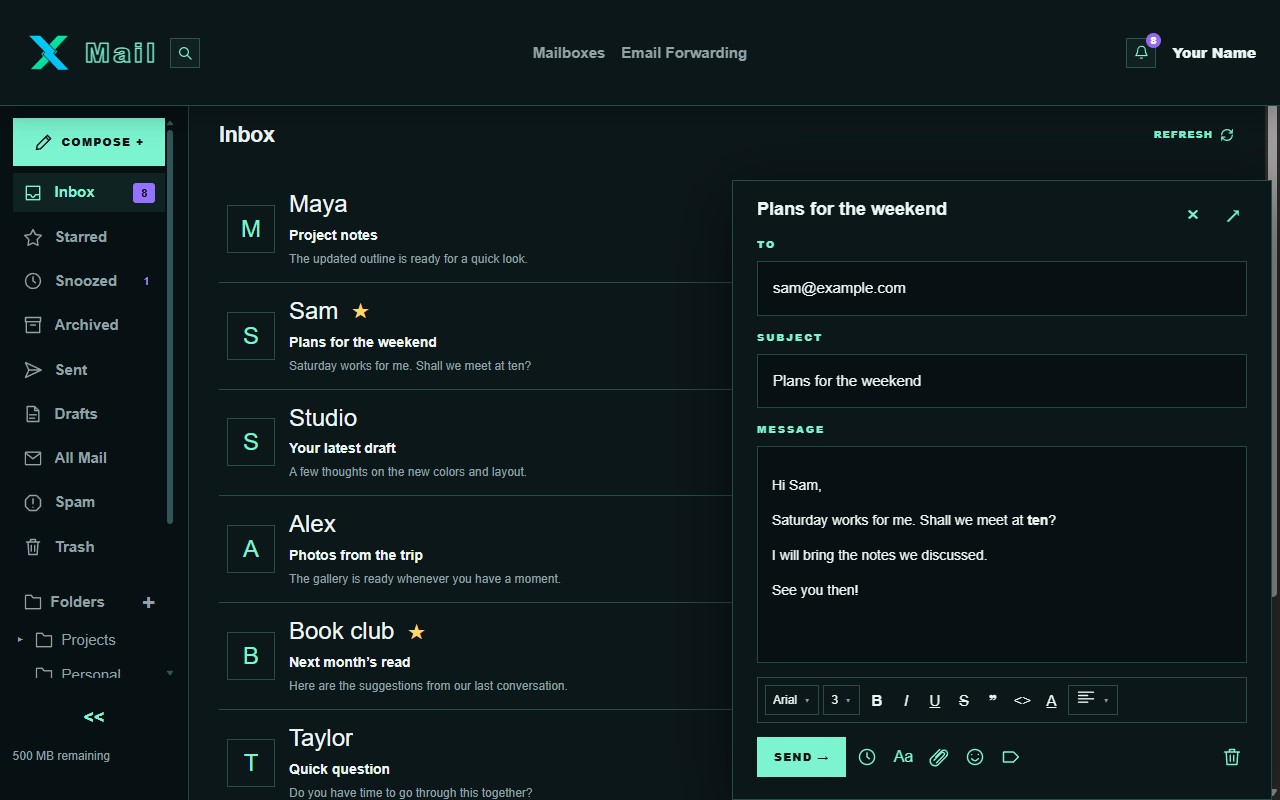
Compare plans
Plans change your storage, aliases, forwarding and mailbox allowances. Your mail stays in the same account.
Free
Free
- 500 MB storage
- 1 alias
- No forwarding
- 50 MB attachments
- 1 mailbox
Mini
$1/month
- 25 GB storage
- 3 aliases
- 3 forwarding folders
- 250 MB attachments
- 1 mailbox
Plus
$3/month
- 25 GB storage
- 3 aliases
- 10 forwarding folders
- 500 MB attachments
- 3 mailboxes
Pro
$8/month
- 250 GB storage
- 25 aliases
- Unlimited forwarding
- 500 MB attachments
- 8 mailboxes
Custom
Your choice
Set the allowances that fit your mailbox.
- 15–100 GB storage
- 1–50 aliases
- Choose forwarding folders
- 50–500 MB attachments
- 1–10 mailboxes
Storage and alias limits are shared by the mailboxes on your account. See Plan in settings to review the full allowances and manage a change.
Take your mailbox with you.
Use Xunaro Mail in your browser, or install the app on Windows or Android. Your mail stays with your account. Themes and animation preferences are saved on the device you are using.
A few things you might want to know.
How do I create a Xunaro Mail address?
Choose an available name above. Create or sign in to a Xunaro Me account, then finish setting up your mailbox. Your Me account is the login you use for Mail, so you do not need a separate Mail password.
What is included with Free?
Free includes 500 MB of account storage, one mailbox, one email alias and attachments up to 50 MB. You can use conversations, folders, labels, stars, drafts, scheduled send, snooze, search and themes. Forwarding is available on paid plans.
Which address will I get?
Addresses currently use @xunaromail.com. The name picker checks whether your chosen name is available before you continue. Your main address, aliases and additional mailboxes are managed from the same account.
Can I use Mail on my phone?
Yes. The website adapts to your screen, and there are Xunaro Mail apps for Android and Windows. On a phone, swipe to manage conversations and pull down to refresh the mailbox. Your email is stored on the server and is available when you sign in on another device.
What happens if I choose a smaller plan?
Existing messages, attachments and mailboxes are not automatically deleted because you downgrade. You can review the change and choose which aliases, forwarding folders and mailboxes stay active. Storage above the new limit can restrict incoming mail and sending attachments; inactive mailboxes remain available to read and export.
Where can I get help?
Open Xunaro Support to start a live support conversation or submit a report. You do not need an account to use Support. You can also open Support from your account menu after signing in.
Open Support →A name of your own.
A place for your mail.
Choose your address and get started with Xunaro Mail.
Choose your email ↑Need a hand? Contact Support →